14 MOTION REC
MENU
14 MOTION REC
14.1 Description
MOTION RECORD is a performance tool that allows you to record and loop manual adjustments of almost any parameter on MOTOR Synth’s front panel and its various screens. Furthermore, MOTION RECORD can also record polyphonic performances on the KEYPAD.
There are eight MOTION RECORD LANES available and each lane can be assigned to a single parameter. Additionally – each MOTION REC Lane can have a variable length. All recorded motion lanes can be individually edited post-recording – this includes changing playback speed and playback direction as well as applying individual LANE mutes.
The recording and playback of motion lanes can be made independent of the MASTER TEMPO or it can be synchronized with it. Finally, the MOTION RECORD LANE’S can be synchronized with the SEQUENCER.
14.2 List of parameters
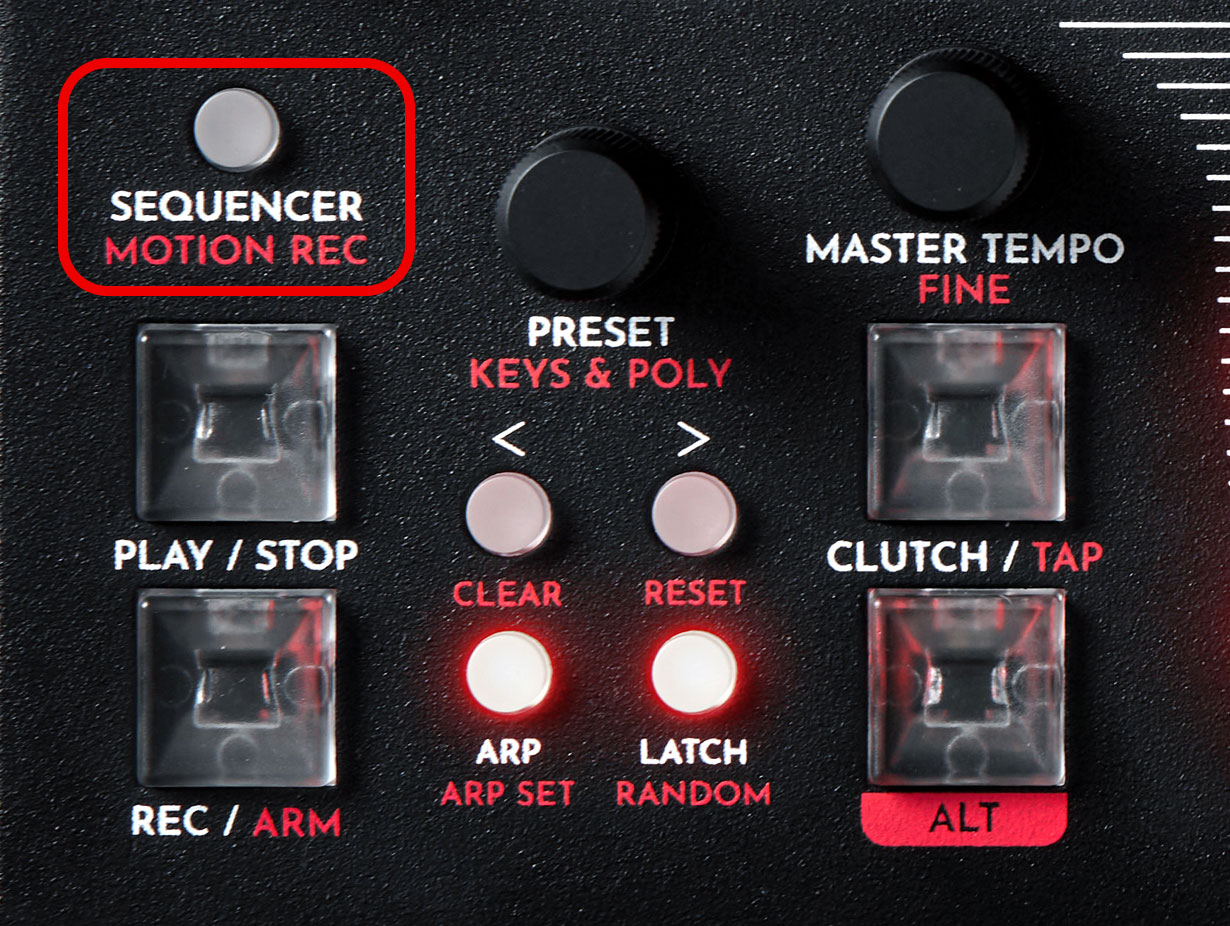
The record and playback functions are controlled with the PLAY / STOP and REC / ARM keys. All MOTION RECORD LANES are controlled from the MOTION REC SCREEN. To access the MOTION REC SCREEN push the ALT + SEQUENCER / MOTION button. This list contains an overview of all parameters in this section. For further information refer to the Instructions sub-section below.IN THIS SECTION
| PARAMETER | CONTROL | DESCRIPTION | VALUE RANGE |
|---|---|---|---|
| Play status | PLAY / STOP key | The playback status of all LANES | Play
Stop |
| Record status | REC / ARM key | The record state | Not recording
Armed Recording |
| [SPEED] | ◁ RIGHT SCREEN ENCODER | The playback speed for an individual LANE | “1X”, “2X”, “3X”, “4X” |
| Direction [DIR] | ◁ RIGHT SCREEN ENCODER | The playback direction of an individual LANE | “>” Forwards
“<” Backwards “< >” Ping Pong |
| [MUTE] | ◁ RIGHT SCREEN ENCODER | The mute status of an individual LANE | Not muted
Muted |
| [SYNC ON REC] | ◁ RIGHT SCREEN ENCODER | The recording synchronization | “FREE” free running, not synced
“BPM” synced to BPM “PAT” synched to the currently playing SEQUENCER PATTERN |
| PARAMETER | CONTROL | DESCRIPTION | VALUE RANGE |
|---|---|---|---|
| Play status | PLAY / STOP key | The playback status of all LANES | Play
Stop |
| Record status | REC / ARM key | The record state | Not recording
Armed Recording |
| [SPEED] | ◁ RIGHT SCREEN ENCODER | The playback speed for an individual LANE | “1X”, “2X”, “3X”, “4X” |
| Direction [DIR] | ◁ RIGHT SCREEN ENCODER | The playback direction of an individual LANE | “>” Forwards
“<” Backwards “< >” Ping Pong |
| [MUTE] | ◁ RIGHT SCREEN ENCODER | The mute status of an individual LANE | Not muted
Muted |
| [SYNC ON REC] | ◁ RIGHT SCREEN ENCODER | The recording synchronization | “FREE” free running, not synced
“BPM” synced to BPM “PAT” synched to the currently playing SEQUENCER PATTERN |
14.3 Instructions
14.3.1 Recording and deleting MOTION RECORD LANES
The MOTION RECORD engine is always ready to start recording parameter changes, and can be quickly armed and engaged by the REC / ARM key. However, opening the dedicated MOTION REC SCREEN can be useful for monitoring the recording process.To view the MOTION REC SCREEN press ALT + SEQUENCER / MOTION REC.
There are two ways of recording parameter changes.
Instantaneous recording:
First choose a parameter to be recorded, for example the FILTER CUTOFF FREQ knob, then press and hold down the REC key and start adjusting the desired parameter. A MOTION REC LANE will be created as soon as the REC is pressed and held down and it will keep recording until the REC key is released, or for as long as the internal memory allows.
Note: Each new recorded parameter takes up one LANE and during a recording only one LANE can be recorded. To record several parameter movement lanes, you need to record them onto separate LANES one by one.
Armed recording:
The second way of creating MOTION REC LANES is to use the ARM function. Press ALT + REC / ARM to arm the MOTION RECORD engine. The REC key is lit up red and the MOTION RECORD will remain armed until any parameter is adjusted. The recording begins as soon as any parameter change is detected. The REC key will instantly light up white indicating that a new LANE has been created and that the recording is in progress. To stop the recording press REC, which will complete the recording process and start playback of the newly created LANE.
In this example CROSS MOD knob changes are recorded onto LANE 1. The bar represents the length of recording.
Press the PLAY / STOP key to start and stop the playback of all MOTION RECORD LANES.
To navigate between the LANES turn either the PRESET encoder or the ▷ LEFT SCREEN ENCODER. The selected LANE is indicated by the highlighted parameter name.
To delete the selected LANE press ALT + > / RESET.
To delete all LANES press ALT + < / CLEAR.
Press the PRESET encoder to mute the currently selected MOTION RECORD LANE.
14.3.2 Recording synchronization
Each MOTION RECORD LANE can either be recorded freely (off the tempo grid), or synchronized to the master BPM or to the length of currently playing SEQUENCER PATTERN. The selection of synchronization needs to be made before a LANE is recorded.Enter the MOTION RECORD SCREEN by pressing ALT + SEQUENCER / MOTION and press the > arrow button to open the MOTION REC SETT SCREEN. Use the ◁ RIGHT SCREEN ENCODER to set the [SYNC ON REC] value.
“FREE” is a free running (not synchronized) recording.
“BPM” is a synchronized recording that snaps to quarter note subdivisions of the MASTER TEMPO.
“PAT” synchronizes the recording to the currently playing SEQUENCER PATTERN. The recording length is synchronized to PATTERN length and motion recorded events are quantized to PATTERN steps. If another PATTERN is being played, the recorded LANE will not be played. If the same parameter is also recorded for another PATTERN, each portion of the LANE will be played during the corresponding PATTERN.
Note: The “PAT” mode requires the SEQUENCER to be running.
Tip: It is possible to have different synchronization settings for each LANE, thus enabling synchronized and free-running parameter movements at the same time. In the example below all three synchronization options are used.